Migration agent CRM
Enquiries that come back when their chances do.
Every enquiry is assessed the moment it arrives, followed up at a pace set by its chances, and re-assessed every morning after that. When a round, a rule or a date improves someone's outlook, they're back at the top of your list with the reason.
The problem
Most enquiries go quiet after the first call. A general CRM keeps their names and a follow-up date someone typed in. It can't tell you which of them now has a case, because it doesn't know what a cut-off, a state's settings or a birthday does to a points score. So the old enquiries become a list nobody works, and the leads whose chances improved are never called back.
How an enquiry moves
- It arrives. A caller you add in a few seconds, or a visitor to the enquiry form on your website. A website enquiry waits on Today until someone acknowledges it, so none sits unanswered in an inbox. If the same person enquires twice, Pathway offers their existing file before creating a new one.
- It's assessed. The moment they answer, the rules engine works out their points and checks ten skilled, employer and graduate visas. The enquiry is labelled worth a consultation, can't tell yet, or nothing open today, with the reason.
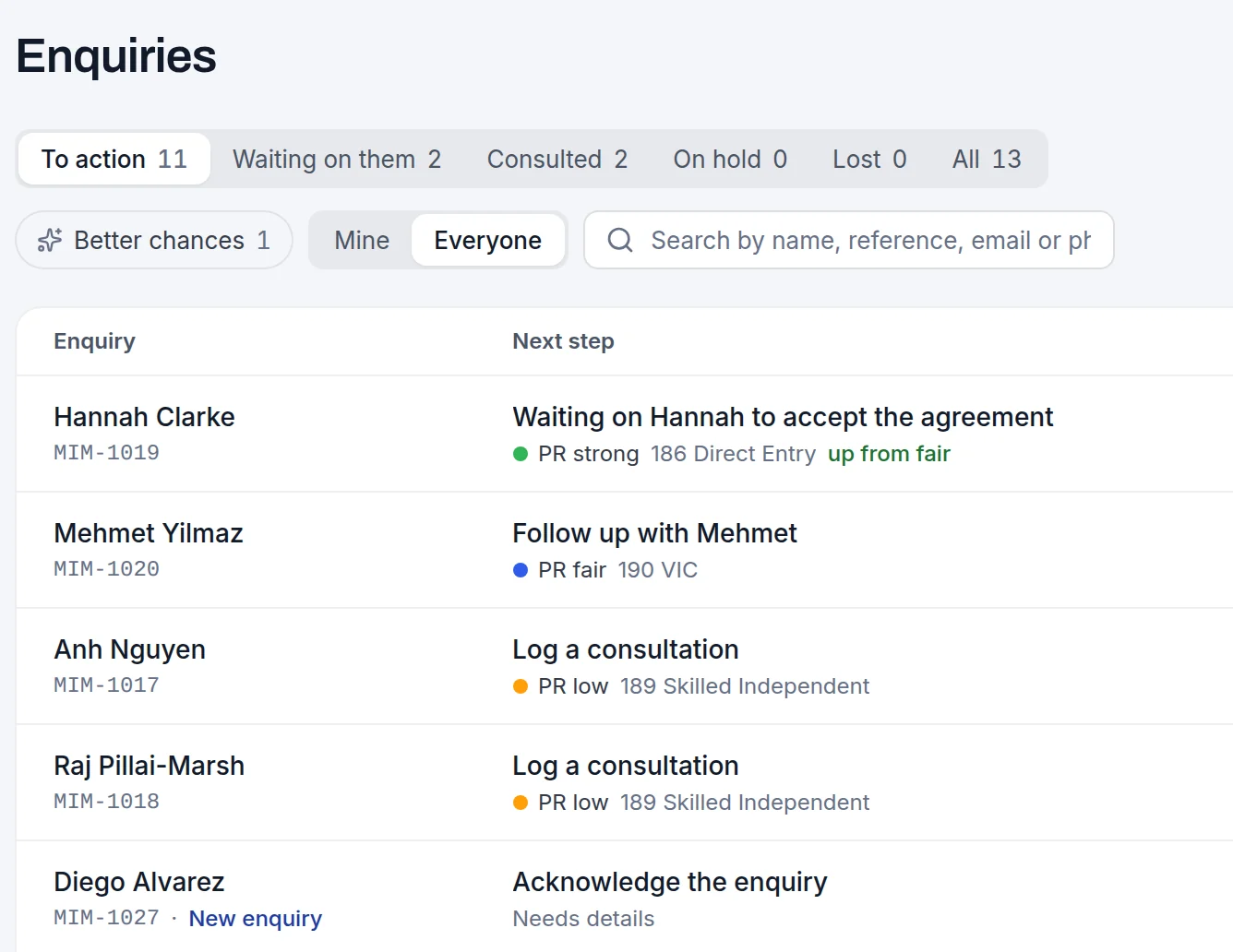
- It's paced. A contact-by date is worked out from where they stopped, how strong their case is, and any date on the file that can't wait.
- It comes back. Every morning Pathway re-assesses each open enquiry, and each closed one who finished the questionnaire, when the rules, a round or the day has changed. An outlook needs the questionnaire's answers: imported records carry too few until the client completes it. A lead whose PR outlook is now better than when you last followed up is back on your list that morning, with what changed.
- It engages. The client accepts the agreement and the Consumer Guide in their portal (or you record that they did it outside Pathway), and the same file runs the visa application.
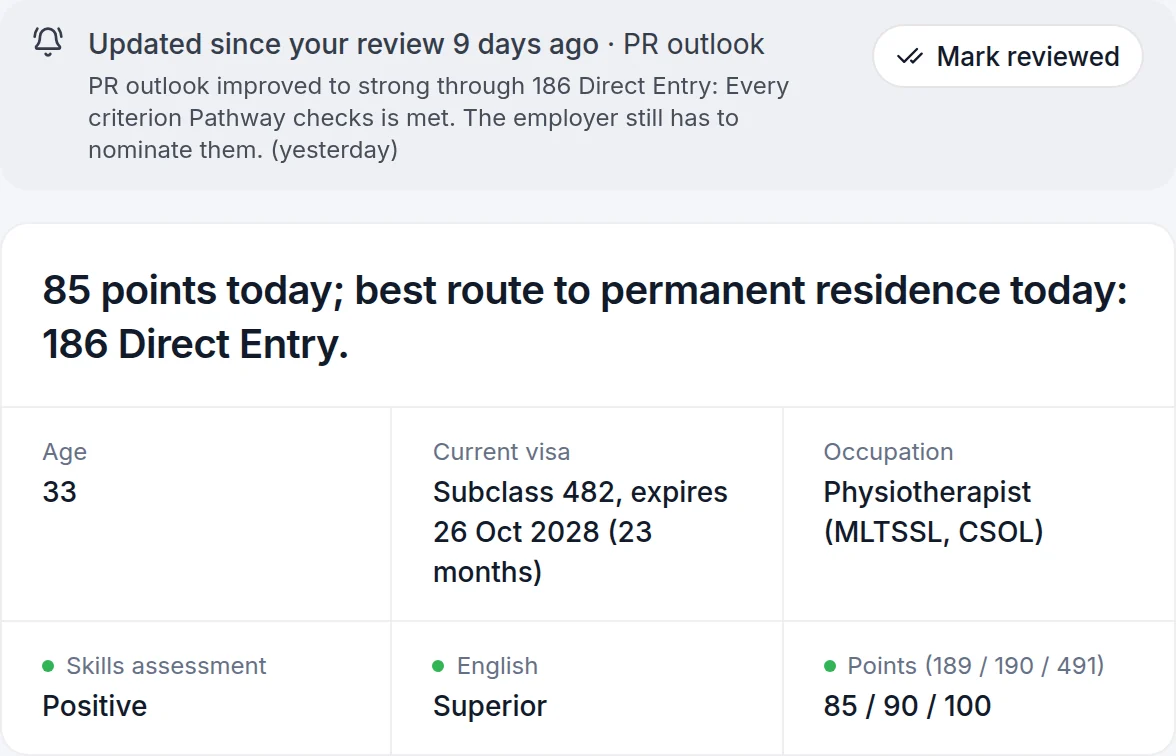 Hannah's file the morning her outlook improved: updated since the agent's review, and up from fair since the last follow-up.
How Pathway decides when to call
No other practice system publishes this, so here it is. The contact-by date is the earliest of these:
| What | The rule |
|---|---|
| Where they stopped | 1 day after a new enquiry; 3 days after the questionnaire is sent; 2 after it's opened; 2 after it's submitted; 7 after a consultation |
| How strong their case is | A strong or good outlook halves the wait. A low outlook triples it. No route today makes it four times as long: nurtured, not chased |
| Dates that can't wait | A visa ending (3 months ahead), a passport expiring (6 months), a skills assessment or English result expiring (2 months), an invitation lapsing (1 month), a birthday that costs age points |
| Better chances | An outlook better than when you last followed up makes the date today |
| Your own date | Set one by hand, with a note, or put the lead on hold until a date |
When several reasons apply, the row shows the one that matters most: better chances first, then a date on the file, then your own date, then the ordinary pace. Logging a contact resets the baseline, so a lead doesn't keep coming back when nothing about them has changed.
What you see, and what you do
Enquiries has five views: to action, waiting on them, consulted, on hold and lost. Each row carries the PR outlook and its reason, whose move it is, and the contact-by date with its reason. From the row you can log a contact or a consultation, set a date, call, email, or send a message.
Message, in each lead's menu, picks a fitting template: good news when their chances improved, a reminder when the questionnaire isn't finished, otherwise a check-in. It's filled in from the file, and you edit it before it goes to the client's portal.
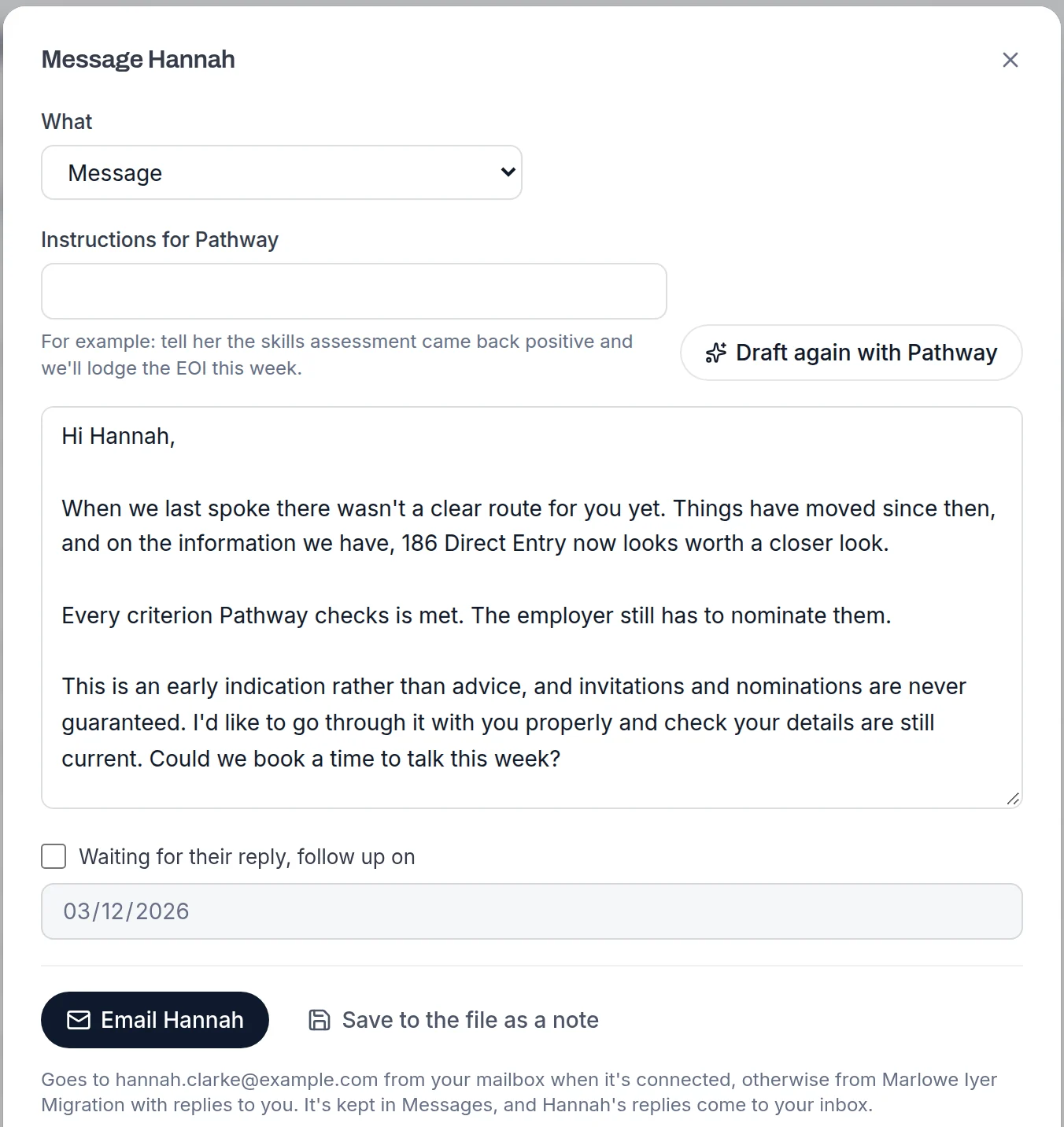 The good-news message that Message opens for a lead whose chances improved.
The questionnaire
A link the client opens on their phone, with your practice's name and logo, and no account or password. Send the link from your own WhatsApp or SMS, or by email from Pathway. The client picks what they need help with on the first screen, and the questionnaire is built from those modules: skilled and employer, partner, student, visitor, citizenship, review of a refusal, trade and the Job Ready Program. Answers save as they go. It asks, in plain words, whether the client agrees to AI helping prepare their advice, and records the answer either way.
When they submit, you get a one-page brief: the best routes, near misses, anything time-sensitive, the questions to ask on the call, and the claims to check against documents. Reminders at 3 and 7 days are there when the owner switches them on. Later, you can ask for updated answers with the same link, and the changes are logged.
The enquiry form on your website
A short form with your practice's name: who they are, their citizenship, where they are and on what visa, occupation, English, qualifications, experience, an employer if there is one, and their message. They agree to be contacted before sending. Each enquiry arrives assessed, with no AI, and can carry straight on to the full questionnaire. The owner finds a link and an embed snippet (it works with WordPress, Squarespace, Wix and any site that takes HTML) under Settings. A hidden field turns away most bots, and a new link stops the old one working.
Engagement, recorded properly
A lead becomes a client when the agreement for services and fees is accepted in the portal, or recorded by hand as accepted outside Pathway, with how and when. Before then, you can ask a lead for documents without treating them as a client. The Consumer Guide is recorded as given in the same step. Consultations are booked on the calendar and logged with what was said and the outcome: going ahead, thinking about it (next contact in a week), or not going ahead, with the reason.
Where a CRM stops and practice management starts
A CRM is enough while you're winning work. Once a client signs, you need visa applications, deadlines, checklists, a portal, agreements and invoices. Many practices run a CRM beside separate practice software and retype the client when they engage. In Pathway it's one file: the answers, the assessment and the brief are already there when the first visa application opens.
What it doesn't do
No bulk email campaigns, no ad tracking, and no scoring from website clicks. The questionnaire collects what the client tells you; it doesn't verify it, and the brief lists what to check. Outlooks are worked out for the visas the engine assesses. Partner, student, visitor, family and citizenship work runs on questionnaires, checklists and steps; Pathway doesn't assess those visas: those enquiries are listed and paced by their dates, without an outlook.
Questions
Does a lead I closed still come back? Yes, if they finished the questionnaire. Closed leads are re-assessed every morning like open ones, and come back only if their outlook improves.
Will the same lead keep reappearing? No. A lead comes back when its contact date arrives or its outlook really improves since you last logged contact, not every day.
Can I send the questionnaire from WhatsApp? Yes: Send the link from your own WhatsApp or SMS, or by email from Pathway.
Bring one enquiry. See what Pathway sees.
A 30-minute demo on an enquiry from your practice, names removed: the assessment, its place in the queue, and when Pathway would bring it back.
Live on 1 December 2026. Every practice starts with a 30-day free trial.
OneFifty. Beyond the ordinary.